
Why Your Plan Speed Isn't the Problem
Millions of American households pay for fast internet plans and still experience sluggish speeds, buffering video, and rooms where the connection simply disappears. The usual suspect isn't the ISP — it's the router's position. Wi-Fi signals are radio waves, and radio waves behave predictably: they weaken with distance, they bend around some obstacles, and they get absorbed or reflected by others.
A 500 Mbps internet plan delivers that speed to your router. What happens between the router and your laptop on the other side of the house is an entirely separate physics problem. Understanding that problem is what lets you fix it without calling a technician or upgrading your subscription. See our step-by-step network setup guide if you're starting from scratch.
~50%
Signal loss per concrete or brick wall
RF engineering studies consistently show dense masonry can attenuate Wi-Fi signals by 50% or more per barrier crossed.
25–50%
Signal reduction per interior obstacle
Each wall, floor, or large furniture piece a Wi-Fi signal passes through reduces effective range, according to general wireless communication principles.
~1,500 sq ft
Typical single-router coverage limit
Most standard home routers are rated for up to 1,500–2,000 square feet under ideal (open, unobstructed) conditions — real-world coverage is often less.
What Building Materials Do to Your Signal
Not all walls are equal when it comes to Wi-Fi. Here's how common American home materials stack up in terms of signal impact:
- Drywall: Minimal resistance — typical interior walls cause only minor signal loss.
- Wood (framing, floors, furniture): Moderate absorption; open-plan layouts fare much better than compartmentalized rooms.
- Brick and concrete: High resistance. A single concrete wall can cut signal strength by 50% or more. Basement concrete slabs are particularly problematic.
- Metal: Near-total reflection. Metal studs, foil-backed insulation, metal file cabinets, and appliances like refrigerators can create dead zones behind them.
- Glass and water: Windows cause some reflection; fish tanks and water heaters can absorb signal surprisingly well.
In a typical ranch-style home with drywall construction, a single router in a good central location usually covers the whole floor. In a brick townhouse or a multi-story home with a concrete foundation, placement decisions become much more consequential.
Foil-Backed Insulation Is a Hidden Culprit
Many homes built or retrofitted after the 1980s use foil-faced insulation in exterior walls and attic floors for energy efficiency. This material acts almost like a Faraday cage for Wi-Fi — significantly blocking signal from passing through exterior walls or between floors. If your home has this type of insulation, expect that signals will struggle to penetrate those boundaries even on a strong router.
The Geometry of Signal Spread
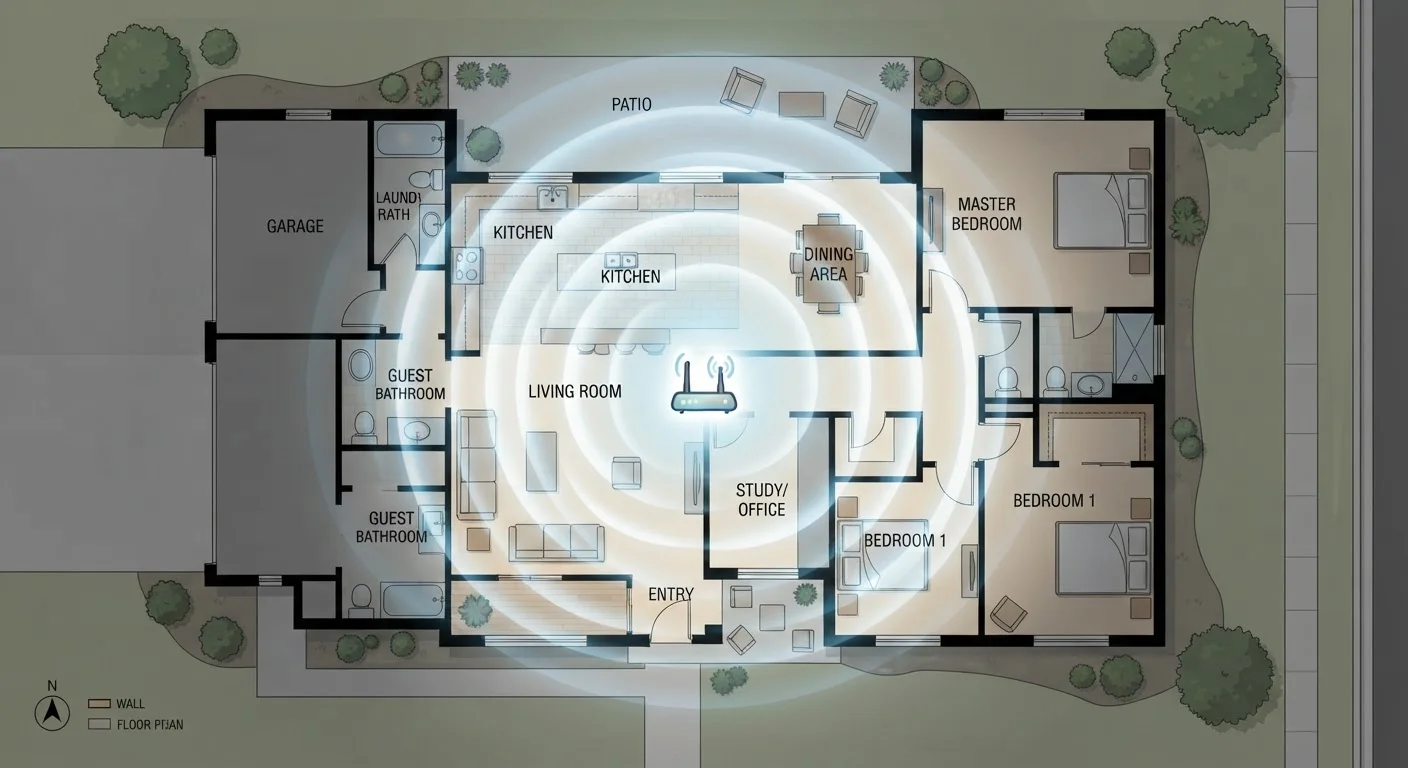
Routers don't broadcast signal like a flashlight pointed in one direction — they radiate outward in roughly spherical patterns, though the exact shape depends on antenna design. The practical implication is straightforward: the closer your router is to the geometric center of your home, the less distance any room is from the source.
Placing a router in a corner of the house — which happens often because that's where cable or phone jacks were installed — means half the signal is immediately wasted broadcasting into your yard. Moving it even 10–15 feet toward the center of the floor plan can noticeably improve speeds in far rooms.
Elevation matters too. Routers tend to broadcast signals in a slightly downward cone. Placing one on the floor limits how well that cone spreads across the living space. A shelf, countertop, or wall-mounted position at roughly chest height tends to work well for single-story coverage. In a two-story home, placing the router on the upper floor's ceiling or the lower floor's ceiling (essentially mid-height in the building) can help both levels.
Run a Speed Test Before and After Moving Your Router
Use a free browser-based speed test tool from a device at the far end of your home. Note the download speed, then reposition your router and test again from the same location. Even a 20–30% improvement in a distant room can make a real difference for streaming and video calls. This takes less than five minutes and gives you objective data to guide your decision.
Common Placement Mistakes and How to Fix Them
Several placement habits are widespread but quietly harmful to Wi-Fi performance:
- Router in a closet or entertainment cabinet
- Enclosures add walls, reduce airflow (causing heat throttling), and muffle signal. Move it to an open shelf nearby.
- Router on the floor behind the TV
- The TV itself is often a metal-backed reflective surface. Raise the router and move it away from large electronics.
- Router tucked in one corner of the house
- Even a small repositioning toward the center pays dividends. Run a speed test at the far end of your home before and after to quantify the difference.
- Router near a microwave or cordless phone base
- These devices operate on the 2.4 GHz frequency, the same band used by older and longer-range Wi-Fi signals. Interference can cause slowdowns even when signal strength looks fine. Learn more about what causes Wi-Fi slowdowns beyond placement.
When One Router Isn't Enough
Even with perfect placement, some homes will never get full coverage from a single router. Multi-story houses, homes with concrete or masonry construction, and floor plans larger than roughly 1,500–2,000 square feet often hit a hard physical limit.
In those situations, the answer isn't better placement — it's more access points. A mesh network system uses multiple nodes that communicate with each other to distribute coverage evenly. Unlike a traditional range extender (which can cut throughput in half by re-broadcasting a weakened signal), mesh nodes coordinate as a unified system. If you want to understand how your router's specs relate to real-world performance before making any changes, our guide on what router numbers actually mean is a practical starting point.
The bottom line: optimizing placement is always the right first step because it costs nothing. But knowing when placement has reached its limit — and what to do next — is equally valuable knowledge for any homeowner.
